

Add a node in the Workflows builder with Add Node. Connect your CRM under
Settings → Connections first.To assign records, map each Default user to their CRM identity under
Settings → Users.
Create record
Create Record adds a new CRM record from values in the trigger or earlier nodes. Use it when a workflow must create a lead, contact, account, company, deal, or another supported object. Later nodes can use the created record’s ID and fields.Salesforce
Salesforce can create a record or update a record that has the same match-field value.
Use Update on conflict for an intake flow that can receive the same lead more than once.
Leave it off when every run must create a separate record.
HubSpot
HubSpot creates a new record from the mapped values. This version does not have Update on conflict. Use Match Record before Create Record when you must prevent duplicates.Match record
Match Record finds 1 CRM record and follows either Match or No Match. Use it before an update, association, or create node when the record might already exist. When several records match, the node uses Prioritize matched records by rules in order. Later nodes on the Match branch can use the matched record’s ID and fields.Salesforce
Salesforce matches the selected object against field conditions.
For example, match a Contact by email. Then use Match to update it and No Match to
create it.
HubSpot
HubSpot can match on property values or through an association with another record.
For example, turn on Match by association to find the Company connected to a Contact
that an earlier node matched.
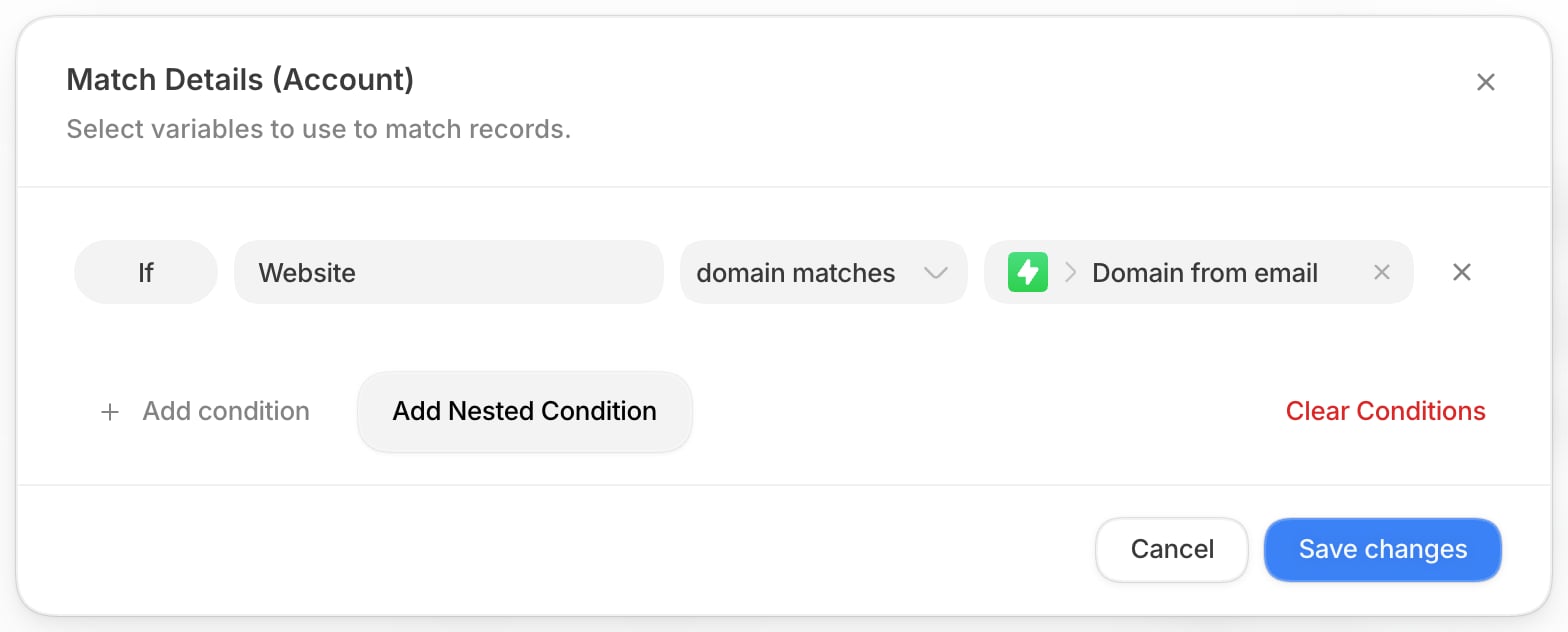
Match an account by company domain
Website fields rarely hold a clean domain. One account storeshttps://www.hp.com/en-us,
another store.hp.com, and a third holds 2 URLs separated by a comma. The
domain matches operator reduces both sides of a condition to the company’s domain before
it compares them, so all of those match a lead from hp.com, and a lookalike such as
companyhp.com does not.
1
Open the conditions
In the Match Record node, set Record to Account and select Edit under
Match Details.
2
Compare the website with the lead's domain
Choose Website as the field and domain matches as the operator. For the value,
pick the lead’s email from the trigger and choose Domain from email.
3
Save and test
Select Save changes, then run the workflow with Test. In Run Details, the
Match Record step shows the condition and which account it picked. When the domain
comparison dropped a lookalike candidate, it also shows how many records the CRM returned
and how many survived.
domain does not match is the opposite. It is true when the 2 values belong to different
companies. A value with no company domain, such as a personal email address, makes both
operators false, so the workflow follows No Match instead of guessing.
The operator is offered on URL, email, and domain fields, on Salesforce and HubSpot, and in
Multi-Branch conditions. Hover the selected
operator in the condition editor to see this explanation.
Match Default Record
Match Default Record searches records stored in Default. It does not use Salesforce or HubSpot, so it needs no CRM integration. Use it when a later node needs a Default record selected by conditions. Queue is the only supported record type today.
The node follows Match or No Match. A later routing node can use the matched queue.
Update record
Update Record changes fields on 1 record. Use it after a trigger, match node, or create node has supplied the record ID.Salesforce
Salesforce updates the selected record, then reads the full record back. Later nodes can use the updated ID and fields.HubSpot
HubSpot updates the selected record and returns its updated properties. Later nodes can use the updated ID and fields.
For both providers, Default skips a mapped value when its earlier data is missing. Choose
Set field to null in the value picker when you intend to clear a field.
Convert lead
Convert Lead converts a Salesforce Lead into an Account and Contact. It can also create a new Opportunity. Use it after your qualification path decides that the lead is ready for the account and opportunity process. This node is Salesforce-only. It uses the first converted lead status configured in your Salesforce organization. If the Lead is already converted, the node returns its existing converted record IDs and continues without a second conversion.
Later nodes can use the Lead, Account, Contact, and optional Opportunity IDs.
Create activity or engagement
This shared node creates a Salesforce activity or a HubSpot engagement. Its name changes to match the selected provider.Salesforce: Create Activity
Use Create Activity when Salesforce must record a task, event, or another activity type.HubSpot: Create Engagement
Use Create Engagement when HubSpot must record a Note, Call, Meeting, Task, Email, or Postal mail.
Later nodes can use the created activity or engagement ID and returned record data.
Match activity or engagement
This shared node finds a Salesforce activity or HubSpot engagement. It follows Match or No Match. Use it to prevent duplicates or to find an item before an update.Salesforce: Match Activity
HubSpot: Match Engagement
Update activity or engagement
This shared node changes an existing Salesforce activity or HubSpot engagement. Use it after an earlier node supplies the activity or engagement ID.Salesforce: Update Activity
HubSpot: Update Engagement
For both providers, Default skips a mapped value when its earlier data is missing. Choose
Set field to null when you intend to clear a field.
Create association
Create Association links 2 HubSpot records. Use it after earlier nodes have found or created both records. This node is HubSpot-only.
For example, connect a Contact to a Company. Choose Labeled only when your HubSpot setup
uses a specific relationship label.