> ## Documentation Index
> Fetch the complete documentation index at: https://docs.os.default.com/llms.txt
> Use this file to discover all available pages before exploring further.
# Profile
> Your name, contact details, and integration mappings, shown on your booking pages and meeting invites.
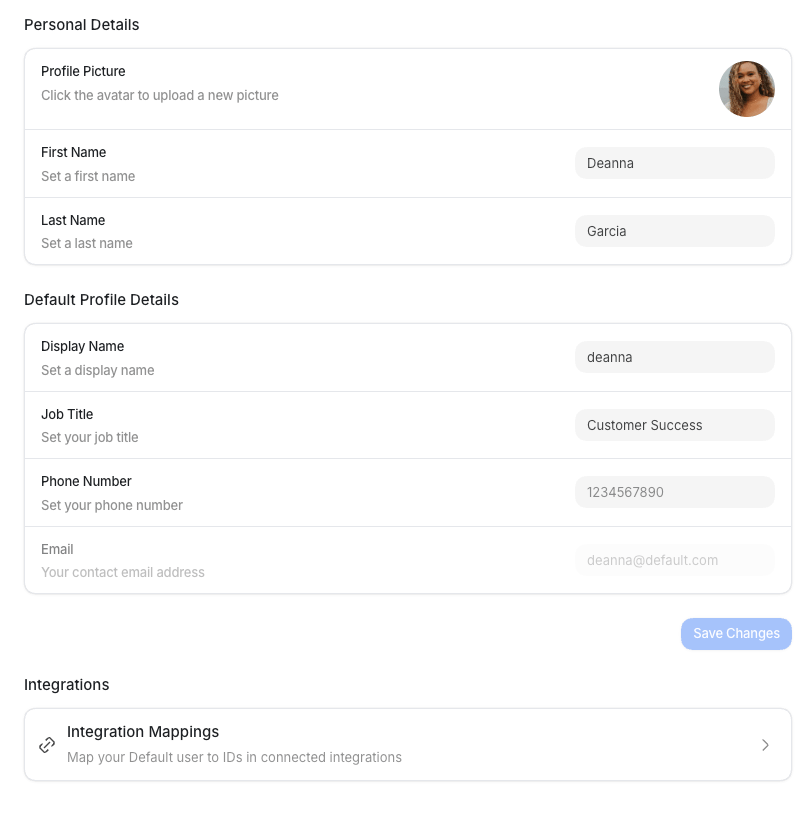
Your **Profile** holds the personal details Default shows on your booking pages and meeting
invites, plus links to your personal integration mappings.
Open **Settings** from the **Dock** (the app bar at the bottom of the screen), then select
**Profile** under **My Profile**. The page has three sections: **Personal Details**,
**Default Profile Details**, and **Integrations**. Edits are staged until you select
**Save Changes**, and Default confirms with "Profile updated successfully."
## Personal details
| Field | What it is | How to set it |
| ------------------- | ---------------------------------------------------------- | -------------------------------------------------- |
| **Profile picture** | The avatar shown across Default and on your booking pages. | Upload a square image from the top of the section. |
| **First name** | Your first name. | Type it in, for example, `Alex`. |
| **Last name** | Your last name. | Type it in, for example, `Rivera`. |
## Default profile details
| Field | What it is | How to set it |
| ---------------- | ------------------------------------------------------------------------------------------------------------------------------------- | ----------------------------------------------------------------------------------------------------------------- |
| **Display name** | The name people see on your booking pages and calendar invites. | Type a friendly public name, such as `Alex from Default`. |
| **Job title** | Your role, shown on some scheduling surfaces. | Type it in, such as `Solutions Engineer`. |
| **Phone number** | Your contact number. Adding one also enables the **SMS** channel in your notification settings, so it must include your country code. | Enter the full number with your country code and a leading `+`, no spaces or dashes, for example, `+15551234567`. |
| **Email** | Your contact email, shown for reference. | Read-only here, it's tied to your login and can't be edited on this page. |
After you save a valid phone number, go to [Notifications](/settings/notifications) to turn on SMS
for your user account.
## Integrations
The Profile page also links to your personal **Integration Mappings**, where you map your
Default user to your IDs in connected integrations, such as your Salesforce or HubSpot user.
Select **Integration Mappings** to open your per-user integrations.